


DIY Video Guest Book - Everything you need to know

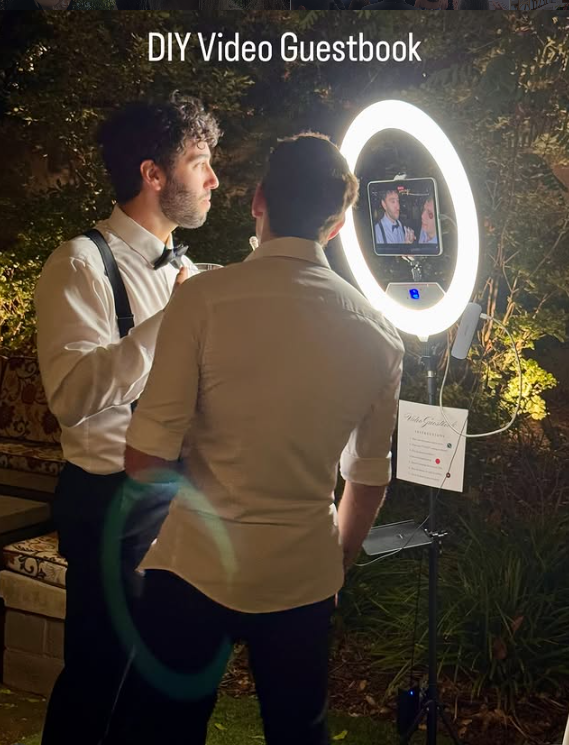
A DIY Video Guest Book at your wedding is a fun idea (especially when the bar is open) as guests share anecdotes, fun memories, and wish you well on your marriage journey.
To DIY a video guest book, you can use a tablet or a smartphone with a dedicated app or service, or set up a more technical station with a good webcam, tripod, and a light. For an easy, app-based option, set up a tablet with a guestbook app, connect it to a power source, and place it in a visible area with instructions. A DIY tech option involves connecting a webcam and ring light to a computer, using a program to run the recording interface, and placing it on a tripod or stand.
STEPS for a tablet one (which you see in the photo):
This method is ideal for a simple setup with minimal technical skill required.
1. Choose an app: Select a guestbook app, such as Guestbook Go for iPad or an app like GuestCam that works on a tablet.
2. Set up the tablet: Connect the tablet to power and Wi-Fi. Place it on a stand or tripod in a central location with clear instructions for your guests.
3. Customize: Use the app’s features to add custom messages, animations, or images to the interface.
4. Instruct guests: Tell guests to use the app’s buttons to start and stop recording their video messages, and how to save or send them.


Comments